• chevron_right

      Netgear’s Nighthawk M6 Pro: The most advanced mobile hotspot yet has C-band 5G, Wi-Fi 6E, and 2.5 Gbps Ethernet

      news.movim.eu / gadgeteerza-tech-blog • 26 April 2022
    Whether I'm travelling locally or abroad, I always travel with a mobile hotspot, to which all my (and usually my family) WiFi devices connect. This one certainly seems to tick all the available boxes...

    It’s called the Netgear Nighthawk M6 Pro, and at $459.99, it ain’t cheap. But it’s a leap over its predecessors in practically every way. Not only is it one of the first hotspots with both actually useful C-band 5G frequencies and speedy-but-spotty mmWave but also AT&T says it’s the first with Wi-Fi 6E for 3.6 Gbps wireless transfer speeds. It’s also got a 2.5 Gbps Ethernet jack for wired gadgets where its predecessor maxed out at gigabit wired speeds.

    Oh, and it’s got a USB 3.2 Type-C port for charging and tethering, a pair of external TS9 antenna connectors if you want to boost its reception, and a chunky 5,040 mAh removable battery beneath that 2.8-inch touchscreen.

    See https://www.theverge.com/23041215/netgear-nighthawk-m6-pro-att-cband-5g-wifi-6e
    #technology #hotspot #mobile #netgear

    • chevron_right

      13 of the best free open source apps for Android

      news.movim.eu / gadgeteerza-tech-blog • 21 March 2022

    Open source apps offer Android users excellent alternatives to their mainstream competitors. Notably, as their source code is accessible to anyone, savvy users can see exactly what's going on under the hood. And even though open source apps can track you, it is impossible to do this without the users' knowledge. There's also more community involvement with open source projects. The most popular open source apps are regularly vetted by users, to ensure a high quality is maintained.

    Installing open source apps is a fantastic way of limiting your reliance on proprietary software while retaining the benefits of the services provided by your phone manufacturer. It's also worth noting that the default apps that come with your phone are not necessarily the best ones out there. You can get a lot of value from 3rd party camera apps, for example.

    See https://www.androidpolice.com/best-free-open-source-apps-for-android/

    #technology #android #opensource #mobile

    • chevron_right

      Best Linux Phone: 5 Options Compared

      news.movim.eu / gadgeteerza-tech-blog • 1 March 2022 • 1 minute

    There are plenty of Linux phones to choose from out there. All kinds of options with different specs from different companies. Each Linux phone with its own unique set of features. In this article, we will guide you through buying the best Linux phone.

    Essentially, if a smartphone is powered by a Linux OS, it’s a Linux phone. Technically, Android uses the Linux kernel too, but phones in this article also use FOSS software and modified Linux distros. Most phones here use the original (mainline) Linux kernel, not a heavily modified Linux kernel like Android uses.

    Most of the Linux phones in this list use desktop-ready software. Convergence is the keyword here.

    Most of the Linux phones here have a modular hardware design (easily replaceable parts) – although this is not a feature specific to Linux, it is a common feature among Linux phones.

    Most Linux phones focus on privacy and security – just like most of the Linux desktop distros. Again, this is not a feature specific to Linux phones, but they do all focus more on privacy, so you might lose out on apps like Facebook and Google.

    A key takeaway right now, though, is that most of these Linux phones can’t be used as a daily driver, and they can’t really replace your current daily driver. They do lack a lot of features and apps you’d need. They’re meant for developers and enthusiasts.

    See https://linuxstans.com/linux-phone/

    #technology #linux #mobile #librem5 #pinephone #fairphone

    • chevron_right

      Have You Been Holding Your Phone Wrong This Whole Time? The way you hold your phone could be damaging your thumb, pinkie, or forearm nerves

      news.movim.eu / gadgeteerza-tech-blog • 12 February 2022

    Quick, how do you hold your phone? Is the bottom of it resting on your pinkie, while you cradle the back with your index, middle, and ring fingers, and your thumb does all the scrolling? Alas, like the many other seemingly easy, intuitive things we do, it is wrong.

    While the one-handed claw is seemingly the most convenient way to grip your device, over prolonged periods of time, it could be doing damage to your wrist and aggravating your ulnar nerve—among other issues.

    At first, I thought this was the old iPhone antenna issue ;-) but I have been noticing if I do a longer session at the end of the day, my pinkie gets a bit sore and I have to shift position. It may well be good to be more conscious about this issue, especially if you use your phone a lot. Maybe this is a good case for slightly thicker phones with more battery capacity, or least more ergonomic phones, instead of just smaller and smaller all the time.

    See https://lifehacker.com/have-you-been-holding-your-phone-wrong-this-whole-time-1848521531

    #technology #mobile #ergonomics #health

    • chevron_right

      Unlike most browsers on iOS, the Documents app can render offline JavaScript and web pages from saved files

      news.movim.eu / gadgeteerza-tech-blog • 5 February 2022

    Whilst trying to get Wordle to run offline on iOS, I noticed neither Safari, Firefox nor Brave would render the offline JavaScript files (apparently all the browsers on iOS have to use the underlying Safari engine, and we know how Apple restricts nice things).

    This is how I came upon the Documents app which can not only do this rendering easily, it also connects to various cloud storage services, can annotate PDFs, opens any file type, has a VPN, and a bunch more stuff all from a single app. Some features like rendering to PDF, though, are pay to use.

    In retrospect, I found out that Safari's offline Reading List function would handle Wordle, but it is nice to know that Documents can actually do so many things inside a single app. And if Wordle has finally gone, then the offline Reading List mode won't be able to save it for offline use (it has to have been saved before the site goes offline), but Documents will still be able to do the job if you have obtained the files later on.

    See https://readdle.com/documents

    #technology #ios #documents #offline #mobile

    • chevron_right

      AltStore is a way to install, and use, sideloaded apps to an iPhone without jailbreaking

      news.movim.eu / gadgeteerza-tech-blog • 4 February 2022

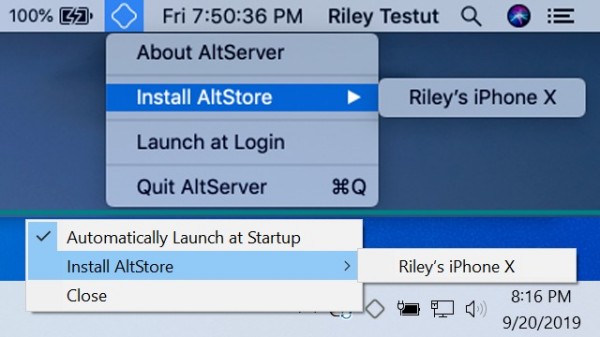
    https://upload.movim.eu/files/62f168f3fbecac605d21a105beda461820293db1/qWt3UO2nLjvd/install-altstore.jpg

    This app store basically allows you to sideload any .ipa file onto your iPhone. That does come with the risks associated wirth obtaining apps from unknown sources, but it is nice to know you can do it.

    The only requirement is that you need a Windows or macOS PC (USB or WiFi connection) for this to work for the installations themselves. There are also some specific steps to be followed to install the AltStore app itself.

    A major focus of these apps seem to be 3rd party game emulators.

    See https://altstore.io/

    #technology #ios #altstore #sideloading #mobile

    • chevron_right

      The 10 best Android games that support cross-play with platforms such as iOS, Windows, Playstation and others

      news.movim.eu / gadgeteerza-tech-blog • 29 January 2022

    https://upload.movim.eu/files/62f168f3fbecac605d21a105beda461820293db1/nnyCYtfe18Fo/runescape.jpg

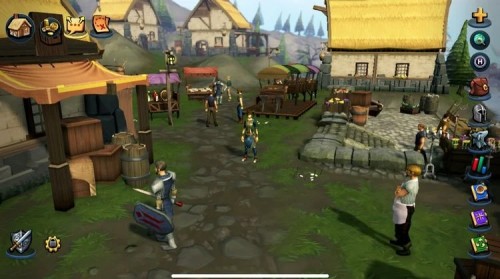
    Games that support cross-play are common on consoles like Xbox and PlayStation, but mobile gamers can often feel left out. Controls suited for console and PC games often don't translate well to mobile. You can buy gaming peripherals, but these are often bulky and inconvenient to carry around.

    But even with these issues, there are plenty of fantastic cross-play games available on Android. These great Android games won't require you to buy any fancy peripherals and were designed with cross-play in mind.

    See https://www.androidpolice.com/best-android-games-that-support-cross-play/

    #technology #gaming #mobile #crossplay #interoperability

    • chevron_right

      Mastercard rolls out 'Tap on Phone' that allows a customer contactless card to tap and pay via a phone (no hardware terminal required)

      news.movim.eu / gadgeteerza-tech-blog • 25 January 2022

    https://upload.movim.eu/files/62f168f3fbecac605d21a105beda461820293db1/KU8ywX8Xfo8a/tapping-mastercard-on-phone.jpg

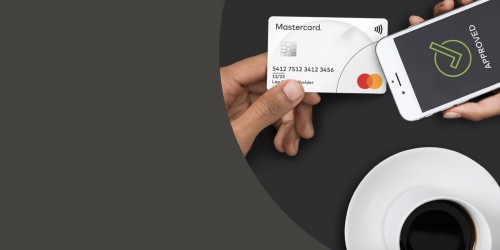
    This cuts out the existing separate hardware terminal that has until now been issued to merchants. This system requires only a phone with NFC (and of course the Mastercard merchant app).

    Tap on Phone allows businesses to accept payments from any contactless card or mobile wallet right from their NFC-enabled device. With no extra hardware required, businesses can take advantage of this on-the-go solution to enable quick and convenient payment options. There is an option to send a receipt to customers through SMS or email.

    See https://www.mastercard.com/global/en/business/overview/start-accepting/tap-on-phone.html

    #technology #banking #SMME #mobile #NFC